Part 2 of 3 · Find
Find when it matters
Organize captures into projects, tag by theme, and search across everything — so the right hook or competitor page is there when you sit down to write.
Storage is easy. Retrieval is the product.
Capture without Find is a folder you'll never open. Collections, projects, and search turn scattered saves into a library you can actually query.
Collections & projects
Collections group items by type or theme (swipe file, reading list). Projects scope workstreams like a launch, an essay, or a GTM push, with optional briefs for context.
Tags you control
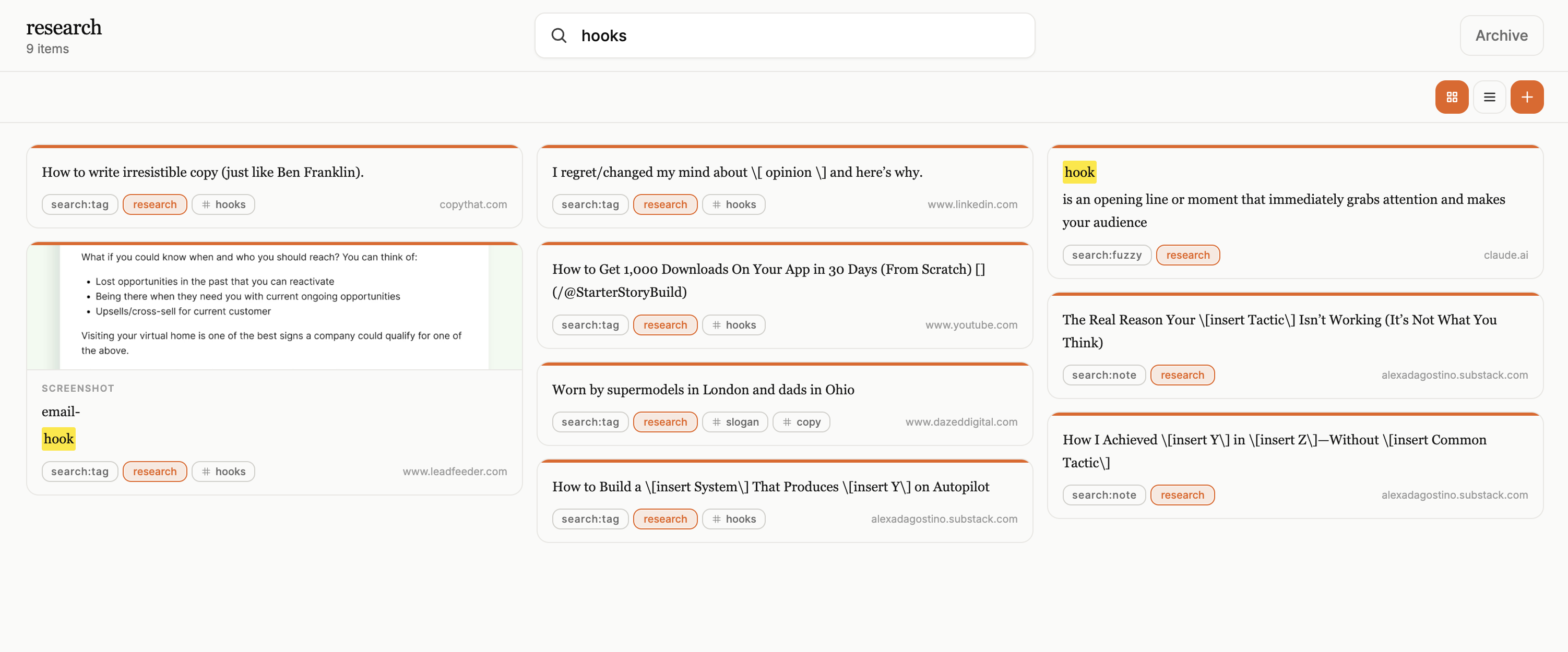
Tag by format, audience, mechanism, or competitor. Tag matches surface first in search, so #hooks or #pricing jumps ahead of loose keyword hits.
Full-text search
Search quotes, notes, and attached text across your library. Filter by project, collection, or type, from the extension side panel or web app.
Semantic & hybrid search
Find related captures by meaning, not just exact words. Useful when you remember the idea ("urgency in email") but not the phrasing you saved.
Filter and browse
Filter screenshots vs highlights vs notes. Browse a project before a deadline and see everything scoped to that piece of work.
Web library + side panel
Search while you browse or from app.gleanit.co. Same library everywhere, organized once, findable from wherever you're working.
A pile of saves isn't a library
Search surfaces the right capture
Query + tags + project scope — the example you need in seconds, not a tab archaeology session.
Turn saves into a searchable library
Capture a few examples, tag them, and try search before your next writing session.
Add to browser (free) Sign up now (free)