In this comparison, we reviewed 10 content curation tools across three jobs. Those jobs are curating for yourself, curating to discover, and curating to publish.
Pocket was everyones favorite save-for-later tool. But unfortunately, according to Mozilla, Pocket shut down on July 8, 2025. User data was permanently deleted after November 2025. Any 2026 list still recommending Pocket is out of date.
Our methodology
What we used. Vendor docs, pricing pages, and hands-on use of tools we already run day to day.
Tools we used: Chrome, Feedly, Gleanit, and each vendor's web app.
How we evaluated. We compared ten tools against our evaluation criteria. Fit by job came first. Ease of capture, then search, free tiers, and whether the product is still maintained in 2026.
What we think. These are practical picks, not lab scores. Match the tool to your lane before you compare features.
In my experience, capture and discovery need separate apps. I used Gleanit for saves. I used Feedly for RSS.
That split is my workflow in practice. What worked for me was keeping research separate from publishing.
Scope of this list. We did not test every enterprise rollout. Curata is here from public specs, not a full pilot.
Limitations include paid tiers we did not trial and team workflows we could not simulate. Pricing changes. Verify on each site before you buy.
Key takeaways
- Best content curation tools split into three lanes: capture-and-retrieve, discovery, and publish-to-audience.
- Most people need tools from two lanes, not one.
- For personal research and swipe libraries, capture tools like Gleanit replace what Pocket did before 2025.
- For RSS-based discovery, Feedly remains the default; for trend research, BuzzSumo surfaces what is performing in a topic.
- For publishing curated content, Scoop.it, Flipboard, ContentStudio, and Buffer each fit different team sizes and workflows.
- Start with your job, not the feature list. Free options exist in every lane (Wakelet, Feedly, Flipboard, Gleanit).
Related topics covered below: the definition of content curation and criteria for choosing by use case.
We also cover budget-friendly options and Pocket alternatives for save-for-later research.
Top picks for capture: tool reviews
This is the lane Pocket used to own: save something now, find it when you need it, do something with it. With Pocket gone, it's wide open.
1. Gleanit review: ideal for capturing research you'll actually reuse
I built Gleanit for this lane after losing too many research tabs while writing.
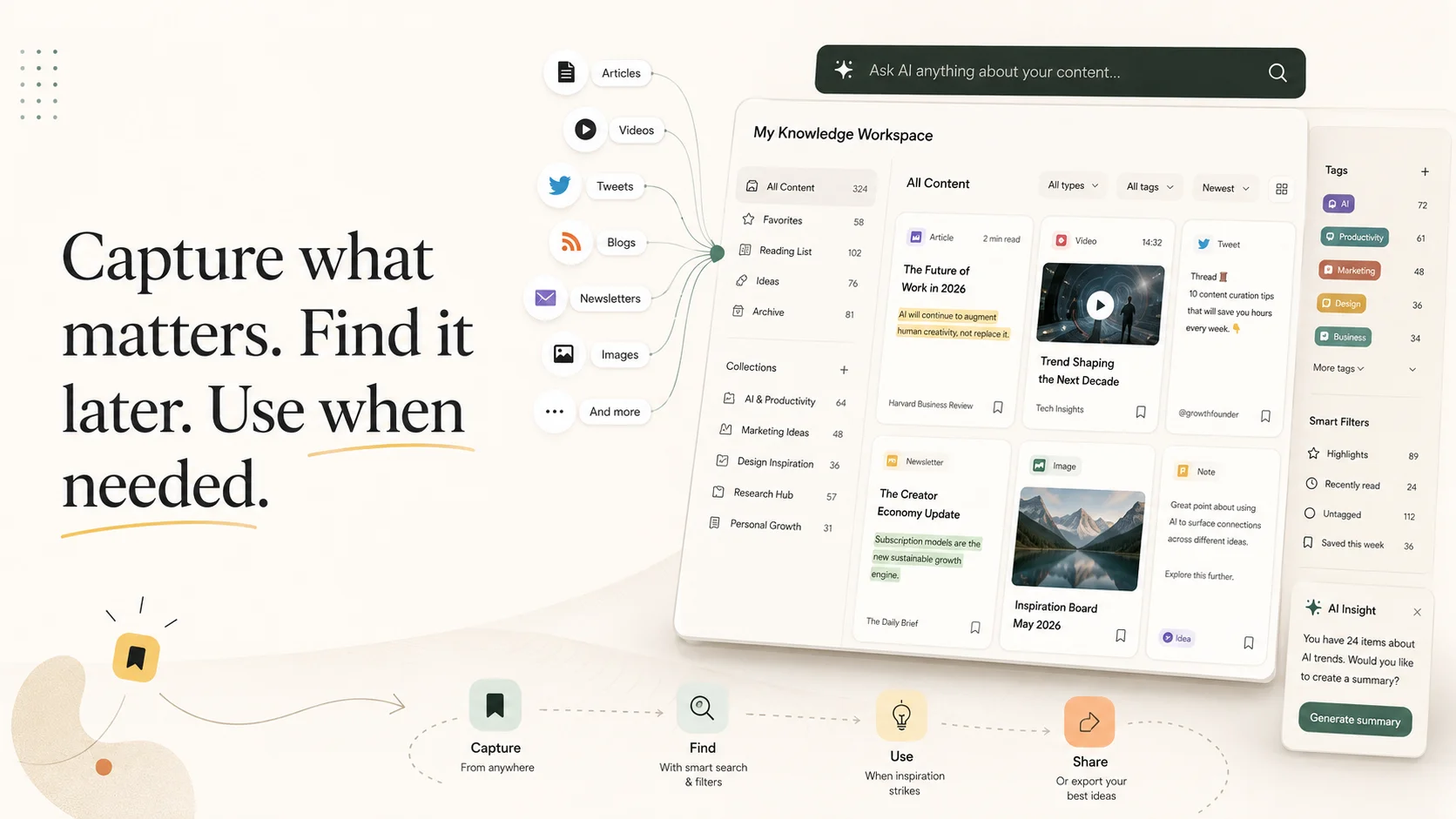
Gleanit is a personal content library built around three steps: capture, find, use. You highlight a passage, screenshot a layout, or clip a page from the web. Add a note about why you saved it. It lands in a searchable library with collections and tags.
The point isn't hoarding. It's retrieval. Storage is easy. Getting the right capture back while you write is the hard part.
It's the natural fit if you keep a swipe file or run founder research. It also helps if you gather sources for long-form writing and lose them in open tabs. For what to save, see our breakdown of recent innovative marketing examples: 28 campaigns with the mechanic behind each one.
- Ideal for: writers, founders, marketers, and copywriters building a personal research or swipe library
- Typical cost: free tier, with paid plans for heavier use
- Our rating: 9/10 for capture-and-retrieve
- Pros: fast capture, searchable library, notes on why you saved
- Cons: newer product that is still evolving, so some workflows and integrations are still being built out
2. Wakelet review: ideal for visual collections you share lightly
Wakelet lets you group links, images, videos, and notes into visual "collections." You can keep them private or share them. It's popular in education and with people who like a board-style layout.
It's lighter on search and reuse than a dedicated research library. Still pleasant for organizing and handing off a set of resources.
- Ideal for: visual collections, classrooms, lightweight sharing
- Typical cost: free
- Our rating: 7/10 for visual collections
- Pros: free, board-style layout, easy sharing
- Cons: lighter search and deep reuse than a research library
Best discovery tools: reviews
Discovery-focused content curation tools surface what's worth saving or sharing in the first place.
3. Feedly review: ideal for RSS-based discovery
Feedly aggregates RSS feeds, newsletters, news sites, and other web sources into clean, personalized streams. Its AI assistant, Feedly AI, helps prioritize topics, deduplicate repetitive stories, mute irrelevant content, and summarize articles.
Feedly has been one of the best-known RSS readers since 2008, and today says its AI gathers, analyzes, and prioritizes information from millions of sources in real time.
I prefer Feedly when I want a steady, controllable feed, not a black-box algorithm.
- Ideal for: monitoring news and niche sources at scale
- Typical cost: free tier; Pro plans run a few dollars a month
- Our rating: 9/10 for RSS discovery
- Pros: huge source index, Feedly AI filters, controllable feeds
- Cons: less suited to save-for-later research libraries
4. BuzzSumo review: ideal for trend and influencer discovery
BuzzSumo shows what content is performing in a topic: most-shared articles, trending angles, and the people driving engagement.
It leans toward SEO and PR more than day-to-day curation. It's excellent for deciding what is worth curating.
- Ideal for: trend research, SEO, influencer discovery
- Typical cost: paid, with higher tiers for teams
- Our rating: 8/10 for trend research
- Pros: strong share and influencer data, clear topic angles
- Cons: paid focus; weaker for day-to-day personal capture
Top publishing tools, compared
If your goal is to consistently post curated content to social channels or a newsletter, these are built for it.
5. Scoop.it review: ideal for topic pages that rank
Scoop.it lets you build topic-focused pages, mini online magazines that collect curated content. Each page is shareable and can earn search traffic.
That makes it useful for thought leadership and authority-building.
- Ideal for: SEO-friendly curated topic hubs
- Typical cost: free tier; Pro at $14.99/month billed yearly or $17.99/month billed monthly
- Our rating: 7/10 for topic hubs
- Pros: shareable topic pages, SEO-friendly structure
- Cons: less flexible than a full social scheduler
6. Flipboard review: ideal for visual, magazine-style curation
Flipboard turns curated articles and videos into "magazines" with a polished, flip-through layout. A built-in audience can follow your collections.
Great for visual storytellers. Weaker if you need scheduling or performance tracking.
- Ideal for: beautiful, shareable curated magazines
- Typical cost: free (Flipboard+ premium available)
- Our rating: 7/10 for visual magazines
- Pros: polished layout, built-in audience, free tier
- Cons: weak scheduling and performance analytics
7. ContentStudio review: ideal for discovery plus scheduling
ContentStudio bridges finding content and publishing it. You surface trending pieces in your niche and schedule them to social channels from one place.
It's a strong all-in-one when curation is central to your social strategy.
- Ideal for: combining curation with social scheduling
- Typical cost: paid plans; pricing varies by plan
- Our rating: 8/10 for all-in-one social curation
- Pros: discovery plus scheduling in one place
- Cons: paid plans required for serious volume
8. Buffer review: ideal if you already schedule with it
Buffer is primarily a social scheduler, but its content suggestions make it a convenient curation add-on for teams already living in Buffer. Not a dedicated curation tool, but frictionless if it's already in your stack.
- Ideal for: teams already using Buffer to schedule posts
- Typical cost: free tier; paid team plans
- Our rating: 6/10 as a curation add-on
- Pros: frictionless if Buffer is already your scheduler
- Cons: not a dedicated curation tool on its own
9. Quuu review: ideal for automated content suggestions
Quuu helps automate curated social content by suggesting and scheduling posts for your chosen audience and channels. It is useful when you want a steady stream of shareable content without doing all the hunting yourself.
Ideal for: automated, low-effort social content suggestions
Typical cost: paid, with trial options depending on the plan
Our rating: 6/10 for hands-off suggestions
Pros: automated curation and scheduling, low hunting effort
Cons: less control over what gets suggested
10. Curata review: ideal for enterprise curation at scale
Curata is an enterprise-grade platform. It uses machine learning to discover, organize, and publish curated content across teams and channels.
It has deep marketing-automation integrations. Powerful and pricey, overkill for individuals, strong for large marketing departments.
- Ideal for: enterprise teams curating at scale
- Typical cost: custom (enterprise-level)
- Our rating: 7/10 for enterprise teams
- Pros: ML discovery, team workflows, automation integrations
- Cons: expensive and overkill for individuals
Choosing the best content curation tools
Start with the job, not the feature list. These are the criteria we used when comparing all 10 tools:
- Personal research or swipe library → a capture-and-retrieve tool like Gleanit (ideal for beginners building a first library).
- Finding good content fast → a discovery tool like Feedly or BuzzSumo.
- Publishing curated content to an audience → Scoop.it, Flipboard, ContentStudio, or Buffer, depending on your use case.
- Large team curating across channels → an enterprise platform like Curata.
Budget options: Wakelet, Flipboard, and Feedly all offer free tiers. Gleanit has a free plan for capture-and-retrieve. Scoop.it Pro is $14.99/month billed yearly or $17.99/month billed monthly. ContentStudio has paid plans; pricing varies by plan.
Our recommendation: most people need two tools: one to discover or capture, and one to share.
The common mistake is choosing a publishing tool when you wanted a place to keep what you find. That is the gap Pocket left behind in 2025.
Frequently asked questions
What are content curation tools?
Content curation tools are software for finding, saving, organizing, and sharing web content. Some focus on capture-and-retrieve for your own research library. Others surface trending topics or help you publish curated picks to an audience. The best content curation tools in 2026 usually excel at one of three jobs (capture, discovery, or publishing), rather than all three at once.
What is content curation?
Content curation is the practice of finding valuable existing content and organizing or sharing it with an audience. Unlike content creation, you are not producing original material from scratch. Good curation adds judgment: you filter the web down to what is worth keeping, reusing, or recommending. Marketers, writers, and teams use it to stay current without writing everything themselves.
What's the best free content curation tool?
The best free content curation tool depends on your job. For visual collections, Flipboard and Wakelet are strong free options. For RSS-based discovery, Feedly has a capable free tier. For capturing and reusing your own research (the lane Pocket left behind), Gleanit offers a free plan. Match the free tier to whether you need capture, discovery, or publishing.
What happened to Pocket?
Mozilla acquired Pocket in 2017, then shut the service down on July 8, 2025. User data was permanently deleted after November 2025. Pocket had been the default save-for-later library for millions of readers. If you relied on it for personal research, a capture-and-retrieve tool such as Gleanit or a visual collector like Wakelet is the closest replacement in 2026.
Is content curation good for SEO?
Republishing curated content alone rarely ranks well in search. Thin aggregation pages often struggle against original sources. Where curation helps SEO is topic hubs with your commentary, curated resource pages with clear structure, and authority-building through consistent picks in a niche. Scoop.it topic pages are a common example when you add original framing around the links.
Verdict
Our recommendation after comparing all 10 tools: Gleanit is our top pick for capture-and-retrieve after Pocket shut down in 2025.
Feedly is best overall for RSS discovery. ContentStudio is the clear winner for all-in-one social publishing. Scoop.it is the top choice for SEO-friendly topic hubs.
Depending on your needs, BuzzSumo is the best option for trend research. Wakelet is the best value for free visual collections.
That is our verdict on the best content curation tools in 2026. Pick by lane. Pair tools when you need both discovery and publishing.
Corrections: ovannes@hearye.co or our editorial policy.