A copywriting swipe file helps marketers, founders, and creators collect useful examples of headlines, emails, ads, landing pages, and sales pages so they can study what works before they write.
But a useful swipe file is not just a folder of screenshots. In most cases, the best swipe files preserve context: where the example came from, why it worked, what pattern it used, and when you might use that pattern again.
This guide explains what is a swipe file, what to save, how to organize one, and how to build a searchable workflow with Gleanit instead of losing good ideas in folders, bookmarks, and random notes.
Key takeaways
- A swipe file is a searchable library of marketing examples you study and adapt — not a folder of screenshots.
- Save formats you actually write: headlines, emails, ads, landing pages, sales letters, and the patterns behind them.
- Build the habit in six steps: capture on the live page, keep the URL, add a note, tag it, search before you draft, prune weak saves.
- The main mistake is saving without context — no source, no note, no search means you never use what you collected.
- A tool like Gleanit helps when retrieval matters: capture from the web, annotate while the idea is fresh, find examples on deadline.
What is a swipe file?
A swipe file is a searchable library of useful marketing examples, notes, and patterns you can reuse when writing. It is not a dumping ground for random screenshots. Every save should carry enough context that future-you can find it, understand it, and adapt it.
"Swipe" doesn't mean plagiarize. It means you save work you admire, analyze why it works, and adapt the underlying pattern to your own offer. You are studying craft, not copying sentences.
Swipe files have roots in direct-response advertising, where copywriters kept physical folders of mailers, print ads, coupons, and sales letters for reference. The format has changed, but the job is similar: preserve examples that can improve future writing. Today most swipe files live on hard drives, Notion pages, or Pinterest boards — same purpose, different container.
Why people build swipe files
Anyone who reads the web for ideas ends up collecting examples. A swipe file turns that habit into a system. Common users:
- Marketers track competitor positioning, onboarding flows, and campaign creative.
- Founders collect GTM inspiration while researching launches.
- Creators study hooks, offers, and proof blocks before drafting their next piece.
- Copywriters build a copywriting swipe file of headlines, emails, and sales pages they can search on deadline.
- Product teams save onboarding flows, pricing pages, and UX patterns from products they admire.
If you read the web for a living, you already have the raw material. The question is whether your swipe file is organized enough to help when it is time to write.
How I use swipe files while building Gleanit
I started using swipe files because I kept losing good examples while researching Gleanit. I would notice a strong headline, a clear pricing page, or a useful onboarding pattern, save it somewhere, and then forget where it came from when I actually needed it.
After building Gleanit, I changed the workflow. Instead of saving only screenshots, I save the source URL, the exact line or section, a short note, and tags like #headline, #landing-page, or #social-proof. In most cases, that extra note is what makes the example useful later.
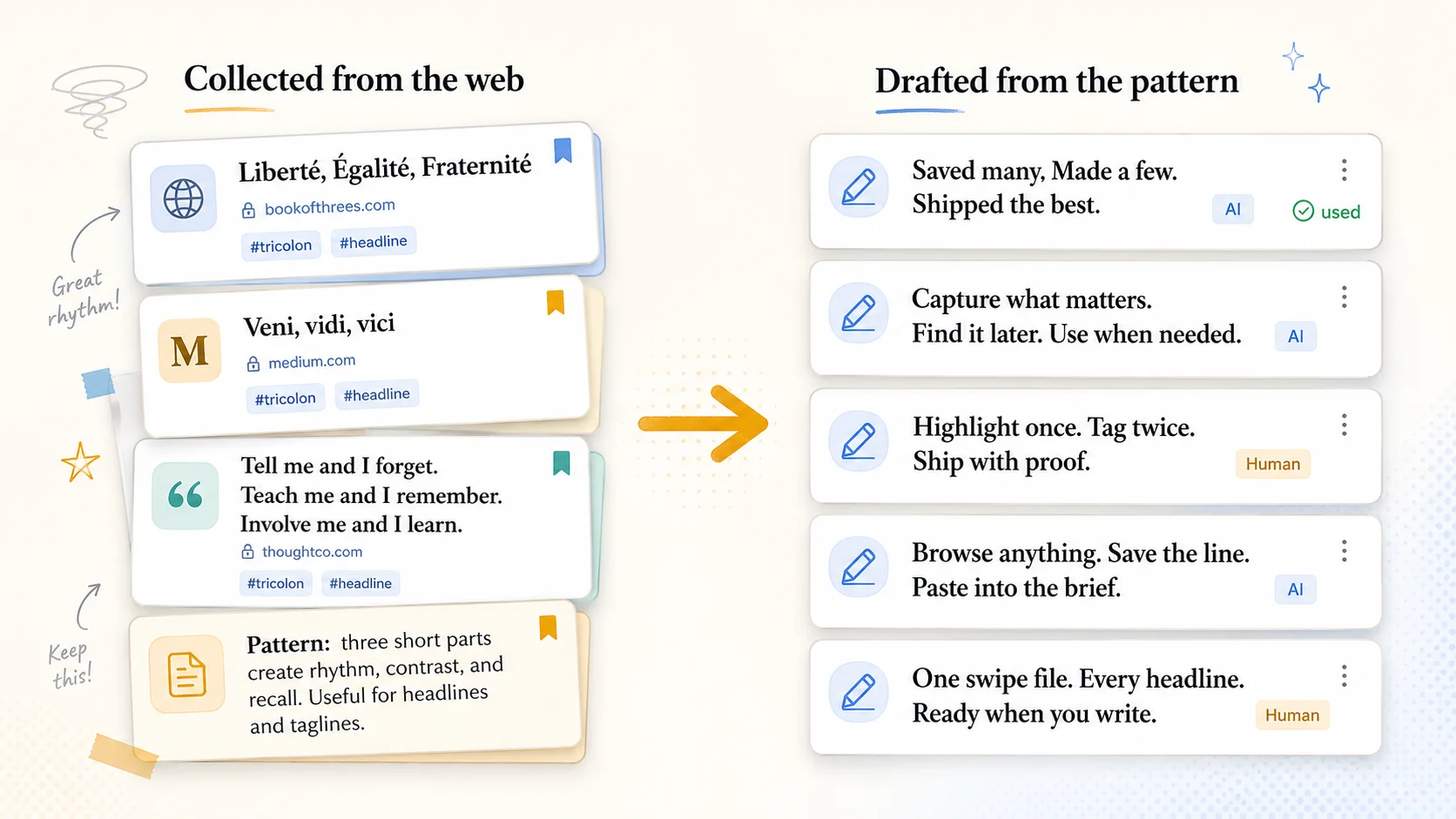
For example, while working on Gleanit’s own marketing pages, I collected examples of three-part headlines and tagged them #tricolon. Later, I used the pattern to draft lines like “Capture what matters. Find it later. Use when needed.” The final copy was original, but the structure came from a pattern I had saved.
What goes into a swipe file?
Start with formats you actually write. Useful categories include:
- Headlines
- Emails
- Ads
- Landing pages
- Sales letters
- Direct mail
- VSLs
- Onboarding flows
- Pricing pages
- Competitor positioning
Full campaigns belong in a swipe file too — see our breakdown of recent innovative marketing examples for twenty-eight campaign mechanics worth saving, or our collection of direct mail examples for fifteen mailers and the mechanic behind each. In future guides, we'll publish dedicated collections for specific swipe file categories like headlines, emails, ads, landing pages, and sales letters. This guide focuses on the foundation: what a swipe file is and how to build one you can actually use.
How to build a swipe file
This is the core habit. Six steps, done consistently, turn scattered saves into a library you trust.
- Capture examples while browsing. Save the headline, email, or layout where you found it — on the live page, not as a paste that lost its source.
- Save the source URL. You need to know where an example came from. Context changes; the original page is your proof.
- Add a note on why it works. Name the mechanism: curiosity gap, social proof, urgency, specificity. Future-you is lazy; present-you is not.
- Tag by format or tactic. Use tags like
#email,#landing-page, or#social-proofso you can filter later. - Search it before writing. Pull up five relevant swipe file examples before you draft. You are not looking for copy to steal — you are looking for patterns to combine.
- Prune weak examples over time. Delete duplicates and saves that no longer teach you anything. A swipe file is a working library, not a museum.
How I evaluated this workflow
This guide is based on a practical workflow I use while building Gleanit, not a formal academic study. I evaluated the process around one question: when it is time to write, can I find the example, understand why I saved it, and use the pattern without copying the original?
For this article, I looked at common swipe file formats: screenshots, bookmark folders, Notion databases, spreadsheets, and Gleanit collections. I compared them using five criteria:
- Capture speed: how quickly you can save the example while browsing.
- Source preservation: whether the original URL and page context stay attached.
- Annotation: whether you can explain why the example works.
- Retrieval: whether you can find the example later by keyword, tag, source, or topic.
- Reuse: whether the saved example helps you write something new.
The main limitation: the best system depends on how often you write. If you only save a few examples per month, a simple document may be enough. However, if you collect examples every week across ads, landing pages, emails, and competitor research, search and tagging become much more important.
In 2026, the problem is less about access to examples and more about retrieval. A marketer can save dozens of screenshots, bookmarks, and notes in a week. However, if those saves do not include a source URL, note, or tag, they become hard to use later.
Nielsen Norman Group’s research on web reading behavior shows that people often scan pages rather than read every word, which makes clear headings, examples, and visual structure important for educational content like this guide.
Google’s guidance on helpful content emphasizes creating reliable, people-first content that serves the reader. That is why this guide focuses on a practical workflow instead of only repeating keyword variations.
Why screenshot folders fail
Claude Hopkins argued that advertising should be treated less like guesswork and more like a discipline built from observed results and tested methods.
Claude C. Hopkins, Scientific Advertising
That is one reason swipe files are useful. They give you a place to collect observed examples, study the structure, and apply the lesson to your own writing.
At first, most people start with a folder of screenshots. It feels like progress. Then they never open it again. A folder of images often becomes archive without retrieval.
- No source. You cannot verify where the example came from or check if it still exists.
- No context. The surrounding page — layout, offer, proof — is gone.
- No notes. You forgot why you saved it three months ago.
- No search. You scroll through hundreds of images hoping something looks familiar.
- No retrieval. When you sit down to write, you cannot find the example you need.
- No pattern recognition. Without tags and annotations, you cannot see that five saves all use the same curiosity-gap structure.
Therefore, the fix is disciplined: every save gets a quote or capture, a one-line note, a tag, and a link. Without those pieces, what is a swipe file in practice? Just storage you never open.
A better workflow with Gleanit
Whether you are learning what is a swipe file or refining one you already keep, retrieval is the habit that separates a library from a graveyard. In practice, Gleanit is built for the part most people ignore: retrieval. It helps you capture examples from the web, keep the source attached, add notes while the idea is fresh, and search everything later when it is time to write.
For example, a typical workflow looks like this:
- Highlight copy on the page you are reading.
- Capture screenshots of layouts, hero sections, or full pages.
- Save URLs automatically so every example keeps its source.
- Add notes on why the example works while you still remember.
- Tag examples by format (
#email) or tactic (#social-proof). - Organize into projects or collections for each client, campaign, or launch.
- Search later when you sit down to write.
Gleanit helps turn a swipe file from a dumping ground into a working research system. See how capture works if you want the step-by-step.
Example swipe file workflow
Here is what a working session looks like in practice.
Tricolon headline example
For example, you might collect several memorable three-part phrases from the web and tag them as #tricolon and #headline. Later, when you need a sharper headline, you are not copying those lines. You are reusing the underlying structure: a short, rhythmic sequence of three ideas. (The tricolon is one of dozens of reusable patterns — see our guide to rhetorical devices examples for 30 of them with famous lines.)
Collected from the web → Drafted from the pattern
Collected from the web
Liberté, Égalité, Fraternité
Veni, vidi, vici
Tell me and I forget. Teach me and I remember. Involve me and I learn.
Pattern: three short parts create rhythm, contrast, and recall. Useful for headlines and taglines.
Drafted from the pattern
Saved many. Made a few. Shipped the best.
Capture what matters. Find it later. Use when needed.
Highlight once. Tag twice. Ship with proof.
Browse anything. Save the line. Paste into the brief.
One swipe file. Every headline. Ready when you write.
One prompt. Five minutes. One curious browsing spiral.
A swipe file is not for copying lines. It is for collecting real examples, spotting the pattern, and using that pattern to write something new.
Landing page research example
You are researching landing pages for a new product launch. You browse three competitor sites and save their hero sections — one uses a bold specificity claim, one leads with social proof, one opens with a curiosity question. For each save, you add a short note ("specificity + number in headline," "logo bar + testimonial above fold," "question hook, no subhead"). You tag them #landing-page and #social-proof or #hooks.
Two weeks later, you sit down to write your own page. You search #landing-page and pull up those three examples. You are not copying their copy — you are choosing which pattern fits your offer, then writing fresh lines around it.
In practice, that is what a good swipe file is for: compressed research you can actually use.
Common mistakes
- Saving too much. Hoarding examples without annotating them creates the same graveyard as screenshot folders.
- Not writing notes. An image without a note is a mystery by next week.
- Copying instead of adapting. Swipe the pattern, not the sentence. Your audience, offer, and voice are different.
- Never reviewing. A swipe file you never search before writing is just storage.
- Using too many tools. Highlights in one app, screenshots in another, bookmarks in a third. Consolidate capture and search in one place.
FAQ
Is a swipe file copying?
No. A swipe file is for studying patterns, not plagiarizing copy. You save examples to understand why they work — the structure, the hook, the proof — then adapt those patterns to your own offer in your own words.
What should I put in a swipe file?
Save formats you actually write: headlines, emails, ads, landing pages, sales letters, direct mail, VSLs, onboarding flows, pricing pages, and competitor positioning. Start with what you need on your next project, not everything you see.
How many examples do I need?
Start with twenty great saves across five formats. Depth beats volume. Twenty annotated examples outperform two hundred mystery screenshots you never look at again.
What is the best tool for a swipe file?
For most working marketers and copywriters, the best tool is one that captures examples from the live web, keeps the source URL attached, lets you add notes while the idea is fresh, and makes everything searchable later. Spreadsheets and screenshot folders work at small scale; Gleanit is built for retrieval when you are writing on deadline. For a broader comparison of research tools, see our content curation tools roundup.
Can teams use a shared swipe file?
Yes. Shared projects and consistent tagging let teams build a common reference library. Annotations are what make sharing useful — without notes on why an example works, teammates just see images without insight.
In short, what is a swipe file? A searchable library of marketing examples with source, notes, and tags — not a screenshot dump. Build one by capturing on the live page, annotating immediately, and searching before you write. That is what a swipe file is in practice: compressed research you can reuse when it is time to draft.
Editor's note: This article was last updated in June 2026. Corrections: email ovannes@hearye.co or read our editorial policy.